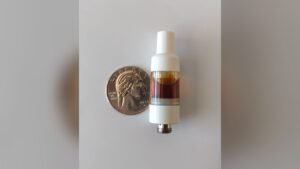
How to Unclog Your Cookies Dual Chamber Vape and Understanding the Blinking Light

The Cookies Dual Chamber Vape has two chambers in one device, but like any vape it can clog or show a blinking light. This guide covers how to unclog it, what the blinking light means, and how to keep the device working.
Understanding the Cookies Dual Chamber Vape
The Cookies Brand Dual Chamber Vape lets you use two different strains or flavors at the same time, so you can switch or mix as you like. That flexibility has made it popular, but it needs regular maintenance to keep working well.
Common Causes of Clogging
Clogging is common in vapes, and the Cookies Dual Chamber is no exception. Knowing the causes makes it easier to prevent:
1. Residue Buildup:
Frequent use leaves residue behind, especially with thick oils. Over time it blocks the airflow.
2. Improper Storage:
Extreme temperatures can thicken or harden the oil. Store the vape in a cool, dry place.
3. Infrequent Use:
When a vape sits unused, the oil can settle and clog the chambers. Regular use keeps it flowing.
4. Overfilling:
Overfilled chambers can leak and clog. Fill only to the recommended level.

How to Unclog Your Cookies Dual Chamber Vape
Unclogging your Cookies Dual Chamber Vape takes a few basic steps:
1. Warm the Vape
Gentle heat loosens thickened oil. Two ways to do it:
• Using a Hair Dryer:
On a low heat setting, warm the clogged chamber gently. Don’t overheat the device.
• Rolling Between Hands:
Roll the vape between your palms to warm it with body heat.
2. Clear the Airflow
Once the oil is warm, clear the airflow:
• Blowing Through the Mouthpiece:
Blow gently through the mouthpiece to push the blockage out. Blowing too hard can damage the device.
• Using a Pin or Needle:
Slide a thin pin or needle into the mouthpiece to clear visible blockages, taking care not to damage the internal parts.

3. Perform a Dry Hit
A dry hit can clear minor clogs:
• Remove the Chamber:
Detach the clogged chamber from the battery.
• Inhale Without Power:
Draw through the mouthpiece with the device unpowered to pull minor blockages loose.
4. Check for Leaks
If it is still clogged, look for leaks. Tighten loose parts and wipe away excess oil.
Preventing Future Clogs
A few habits keep your Cookies Dual Chamber Vape from clogging:
1. Regular Cleaning:
Clean the mouthpieces and chambers with a cotton swab dipped in isopropyl alcohol to stop residue from building up.
2. Proper Storage:
Keep the vape in a cool, dry place out of direct sunlight so the oil holds its consistency.
3. Avoid Overfilling:
Follow the manufacturer’s fill guidelines to prevent leaks and clogs.
4. Use High-Quality Oils:
Good oils clog less. Stick to reputable brands and skip low-quality products.

Understanding the Blinking Light
A blinking light on your Cookies Dual Chamber Vape can point to several issues. Here is what each one means and how to fix it.
1. Low Battery
A low battery is one of the most common causes. Several blinks in a row usually mean the battery needs charging. To fix it:
• Connect to Charger:
Plug the device into a compatible charger and let it charge fully.
• Check the Connection:
Make sure the charger is firmly connected to both the outlet and the device.
2. Connection Issues
Blinking can also mean a poor connection between the battery and the chamber. To fix it:
• Clean the Connections:
Wipe the contacts with a cotton swab dipped in isopropyl alcohol and let them dry before reassembling.
• Tighten the Chamber:
Check that the chamber is firmly attached to the battery. A loose fit can trigger the blinking.
3. Overheating
The light may blink when the device gets too hot. To prevent it:
• Take Shorter Puffs:
Long, continuous puffs can overheat the coil.
• Allow Cooling Time:
Let the device cool between uses, especially during long sessions.
4. Chamber Issues
The chamber itself may be the problem. To check:
• Inspect the Chamber:
Look for visible damage or leaks, and replace the chamber if needed.
• Test with Another Chamber:
If you have a spare chamber, attach it. If the blinking stops, the old chamber was the issue; if not, it’s the battery.
Additional Tips for Maintaining Your Cookies Dual Chamber Vape
These habits help the device last longer and perform better:
1. Regularly Charge the Device
Keep the battery topped up so the vape is ready when you need it.
2. Use Compatible Accessories
Use only accessories supplied or recommended by Cookies. Incompatible ones can damage the device or hurt performance.
3. Monitor Oil Levels
Watch the oil level in each chamber. Running a chamber completely dry can burn out the coil.
4. Handle with Care
The dual chamber design is durable, but drops can still damage it.

FAQs about Cookies Dual Chamber Vape
1. How Often Should I Clean My Vape?
Clean the mouthpieces and chambers weekly, or more often with heavy use.
2. Can I Use Any Oil with My Vape?
Use high-quality oils from reputable brands. Avoid oils that are very thick or contain impurities.
3. What Should I Do If My Vape Doesn’t Turn On?
Check the battery and connections. If it still won’t turn on, charge it or reset it following the user manual.
4. Why Is My Vape Producing Less Vapor?
Weak vapor usually comes from a low battery, clogged airflow, or old oil. Charge the device fully and clean the mouthpieces regularly.
5. How Do I Know When to Replace the Chamber?
Replace it if performance drops noticeably, you see damage, or it tastes burnt even after cleaning.
6. Is It Safe to Travel with My Vape?
Yes, but check local vaping laws first. Pack the vape in your carry-on and follow airline rules.
7. Can I Use My Vape While It’s Charging?
It’s best not to. Vaping while charging can overheat the device and damage the battery.
8. How Long Does the Battery Last?
It depends on use. A full charge can cover several hours of continuous use or a few days of moderate use.
Conclusion
Most problems with the Cookies Dual Chamber Vape come down to clogs, charging, or a loose connection. Warm and clear a clogged chamber, read the blinking light as a sign to charge, clean, or reseat the chamber, and store the device somewhere cool and dry. Regular cleaning, quality oils, and careful handling will keep it working longer.